UK AI consulting

Cut manual document steps on scoped workflows — without ripping out Microsoft 365.

Document workflow automation on Microsoft 365 for UK teams means re-engineering high-volume work in Word, Excel, Outlook, Teams, and SharePoint using governed AI — often alongside ChatGPT Business or OfficeMaker where document generation is the bottleneck, and Power Automate where the job is routing, approvals, or system-to-system triggers rather than drafting. AI Build Group maps the workflow first, then recommends Copilot, ChatGPT Business, OfficeMaker, Power Automate, or a custom assistant based on where work actually happens and what IT can defend.

Written by Founder & Lead Architect

Reviewed by AI Build GroupEditorial review

Published

Copilot seats without a process map just make a broken handoff faster to draft. Map the pack, name the reviewer, then choose Copilot, ChatGPT Business, or OfficeMaker for the step that actually hurts — that is Microsoft 365 AI automation that survives contact with a busy week.

Tim SavigarFounder & Lead Architect, AI Build Group
Cut manual document steps on scoped workflows — without ripping out Microsoft 365. — AI Build Group UK
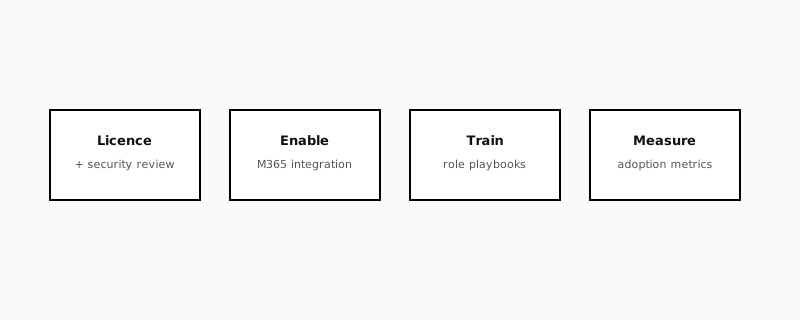
Microsoft 365 AI automation phases from workflow mapping through governed Copilot and document automation

Copilot licences alone do not fix broken handoffs

Manual document prep, status chasing, and approval loops still consume senior time even after Copilot seats arrive. Teams buy a licence hoping formatting and chase emails disappear — then discover the real problem is handoffs without owners, inconsistent templates, and context scattered across mailbox, Teams, and SharePoint. Without workflow redesign, Copilot becomes another tool that drafts text inside a broken process. Automation that sticks starts with the process map, review gates, and a governed AI path — not another subscription line.

What we automate in your first sprint

  • Contract and compliance pack generation with named review gates
  • Status summaries and next-action drafts from mailbox and Teams context
  • Repeatable report and deck production from structured inputs
  • Connection to ChatGPT Business or OfficeMaker for heavier document jobs
  • SharePoint / OneDrive filing rules so issued packs are findable and versioned
  • Joiners-movers-leavers alignment for Copilot and ChatGPT Business seats
  • Power Automate flows for approval routing, notifications, and system-to-system handoffs
  • Sensitivity labels and DLP policy checks on any workflow AI touches

What is Microsoft 365 AI automation in practice?

It is workflow redesign plus governed AI inside the Microsoft stack you already pay for — not a greenfield platform project. Typical work includes mapping handoffs, standardising inputs, inserting review gates, and choosing whether Copilot, ChatGPT Business, OfficeMaker, or a Domino/M365 assistant owns each step. The output is a shorter path from request to issued document or decision, with an owner at every stage.

When should we choose Power Automate vs Copilot vs ChatGPT Business vs OfficeMaker?

Choose based on where the work lives, whether it needs generative drafting, and what must stay governed. This is the decision tree we actually run with clients before recommending a tool, not a vendor-first checklist:

  • Power Automate — strongest for rule-based routing: approval chains, notifications, file-move triggers, and system-to-system handoffs where no drafting judgement is needed
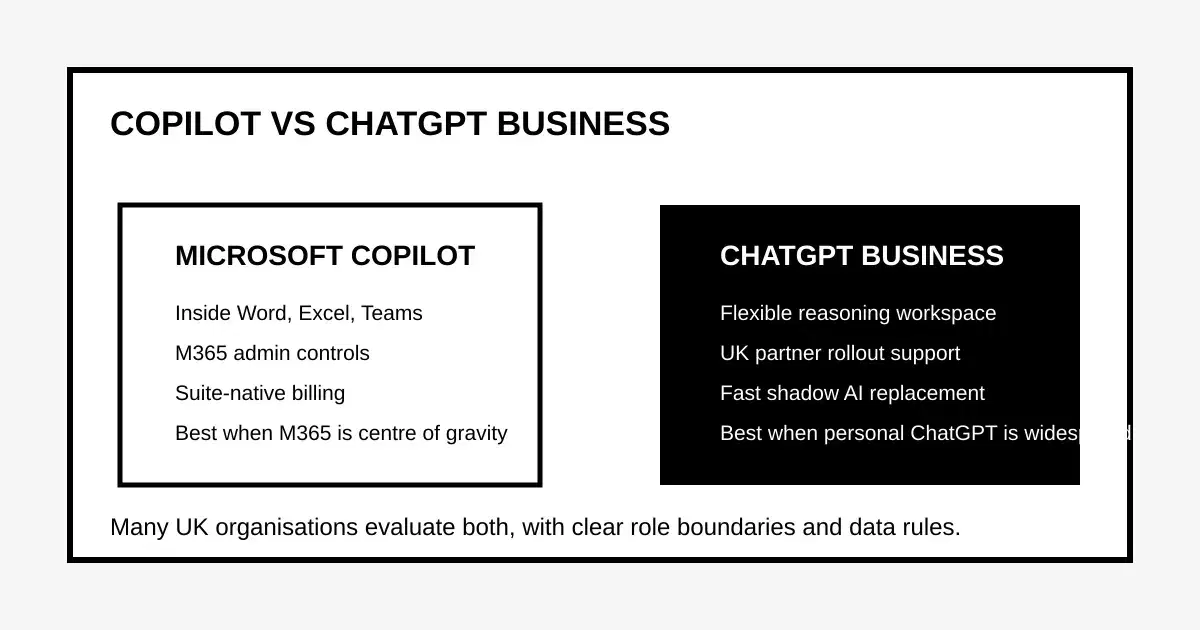
  • Copilot — strongest when the source of truth is already in Microsoft 365 and users need in-app assistance inside Word, Excel, Outlook, or Teams
  • ChatGPT Business — strongest for flexible reasoning, cross-tool drafting, and partner-led UK rollout when teams need a governed workspace beyond M365-native prompts
  • OfficeMaker — strongest for high-volume, template-controlled Word/Excel/PowerPoint packs with approvals, versioning, and archive
  • Hybrid — common: Power Automate routes the approval; Copilot or ChatGPT drafts the content; OfficeMaker issues the final pack

Where does Power Automate fit alongside Copilot and ChatGPT Business?

Power Automate and generative AI solve different halves of the same workflow, and conflating them is the most common scoping mistake we see. Power Automate is deterministic — a trigger fires, a defined set of actions runs, and the same input always produces the same output, which is exactly why auditors and IT like it for approval routing, status notifications, and moving files between SharePoint libraries once a condition is met. Copilot, ChatGPT Business, and OfficeMaker are generative — they draft, summarise, or assemble content that varies with the input, which is the right tool when judgement or language is genuinely part of the job. A typical automated workflow uses both: Power Automate triggers the process and routes approvals, while a generative tool handles the one step that actually needs drafting. Treating a routing problem as an AI problem (or vice versa) is usually why a project scopes bigger and costs more than it needed to.

What does a document workflow look like before and after automation?

The pattern repeats across sectors — the workflow exists, but every handoff is manual and every status lives in someone's inbox. A before/after map makes the actual change visible to leadership rather than promising 'AI will help':

  • Before — a request arrives by email; a named person manually copies data into a template; the draft is emailed for review with no tracked status; approval happens in a reply thread; the final version is saved wherever that person usually saves things; nobody can say how many packs are mid-review without asking around
  • After — the request triggers a Power Automate flow that pulls known fields automatically; a generative tool (Copilot, ChatGPT Business, or OfficeMaker, depending on the pack) drafts the first version against the approved template; a named reviewer approves inside a tracked step, not a reply-all thread; the issued version files itself to the correct SharePoint library with version control; status is visible without asking anyone
  • What does not change — the reviewer, the approval authority, and the final sign-off remain human; automation removes the manual copying and chasing, not the judgement call

Which Microsoft 365 workflows should we automate first?

Start where volume is high, templates already exist, and senior time is lost to formatting or chase — not where judgement is the whole job.

  • Compliance and contract packs assembled from known fields
  • Weekly status summaries from mailbox + Teams threads
  • Meeting follow-ups with owners and due dates
  • Board or client report packs from structured operational inputs
  • Tender or proposal shells that must stay on-brand and versioned

How does UK GDPR shape Microsoft 365 AI automation?

Personal and client data in Outlook, SharePoint, and Teams still needs a lawful basis, minimisation, and processor clarity when AI tools touch it. We align automation with ICO generative AI expectations — purpose limitation, human oversight for consequential outputs, and documented approved tools — so Copilot or ChatGPT Business use does not become an undocumented processing activity. DPIAs remain proportionate for high-risk use cases, not a rubber stamp on every summarisation prompt.

What security controls actually matter for AI-assisted Microsoft 365 workflows?

Most of the controls that matter already exist inside Microsoft 365 — the gap is usually that they were never configured for the specific libraries and mailboxes an automated workflow now touches, not that a new tool is needed. Before a workflow goes live, we check four things specifically:

  • Microsoft Purview sensitivity labels applied to the document types the workflow generates or reads, so classification travels with the file rather than depending on someone remembering to tag it
  • Data loss prevention (DLP) policies scoped to catch the specific data types in that workflow — client account numbers, unreleased pricing, personal data — before they leave an approved boundary
  • Conditional access and audit logging switched on for any account or connector the automation uses, so access is reviewable after the fact, not just at setup
  • A named owner for the Purview audit trail who can answer 'what did the AI touch, and who approved it' without a forensic search

When should we use OfficeMaker inside a Microsoft 365 automation programme?

OfficeMaker is AI Build Group's governed document-automation platform for Word, Excel, and PowerPoint packs — not a replacement for every M365 step. Use it when template control, approvals, versioning, and issued-pack volume matter more than in-app Copilot drafting alone.

  • Word — contracts, compliance packs, and client letters from structured fields
  • Excel — pricing schedules, tender shells, and reporting workbooks from live data
  • PowerPoint — board and client decks assembled onto approved brand templates
  • Workflow — JSON/API triggers, SharePoint filing, and audit trails after human review
  • Hybrid — Power Automate routes approvals; Copilot or ChatGPT Business drafts; OfficeMaker issues the final pack

What does a first automation sprint look like?

A typical UK SME sprint runs two to four weeks: discover one workflow, design the to-be steps and review gates, configure the AI path, train the pilot cohort, and measure cycle time against the baseline. Expansion waits until the pilot proves steps removed and review quality holds — the same discipline as ChatGPT Business rollout, applied inside Microsoft 365.

Power Automate vs Copilot vs ChatGPT Business vs OfficeMaker (first decision)

OptionBest whenWatch-outsTypical first use
Power AutomateThe step is rule-based routing, not drafting — approvals, alerts, file movesNo generative drafting; flows need maintenance as forms and systems changeApproval routing, status notifications, SharePoint filing triggers
Microsoft CopilotWork already lives in M365 appsNeeds eligible M365 base licence; true cost includes that baseIn-app drafting and meeting summaries
ChatGPT BusinessNeed a governed workspace + partner rolloutNot native inside Word/Excel UICross-tool drafting with admin controls
OfficeMakerHigh-volume template packs + approvalsNeeds structured inputs and ownership of templatesContracts, compliance packs, decks
HybridDrafting + routing + issued pack volume all hurtRequires clear tool registry tiers and one named process ownerPower Automate routes; Copilot/ChatGPT drafts; OfficeMaker issues

Free senior time from repeat document prep

Automate the steps that eat afternoons — compliance packs, board summaries, client status updates — with human review gates where regulated or client-facing output leaves the organisation. The target is fewer manual formatting steps, not unsupervised auto-send. Most first sprints pick one high-volume pack type, measure cycle time before and after, and expand only when the review gate holds.

Book a workflow review

Keep teams in familiar Microsoft 365 tools

No rip-and-replace. We design the smallest credible rollout so staff stay in Word, Excel, Outlook, Teams, and SharePoint while AI removes the repetitive middle. Where Copilot is the right fit, we scope licensing and prompt patterns inside M365. Where document generation volume or template control exceeds Copilot alone, we connect OfficeMaker or ChatGPT Business without forcing a platform migration.

See OfficeMaker

Govern AI inside Microsoft 365 — not beside it

Automation without data rules recreates shadow AI inside Outlook and Teams. We align paste rules, retention expectations, and approved tools with your AI governance framework so Copilot and ChatGPT Business sit under the same registry tiers. In practice that means checking Microsoft Purview sensitivity labels and data loss prevention (DLP) policies actually cover the SharePoint libraries and mailboxes an AI workflow touches, confirming conditional access and audit logging are switched on before go-live, and agreeing who reviews the Purview audit trail if a client or regulator asks how AI touched a specific document pack. IT keeps visibility; legal keeps an evidence path — neither has to take the automation on trust.

Discuss AI governance

Use Power Automate for routing, not drafting

Not every workflow problem needs a generative model. When the job is triggering an approval, notifying an owner, or moving a file once a status changes, Power Automate's rule-based flows are simpler to build, cheaper to run, and easier for IT to audit than routing the same task through an AI assistant. We scope Power Automate for the structured, repeatable steps and reserve Copilot, ChatGPT Business, or OfficeMaker for the steps that genuinely need drafting or judgement — so you are not paying for a language model to do what a trigger-and-action flow already does well.

Book a workflow review

Measure steps removed — not licences bought

Success is a measured cut in manual process steps and faster decision cycles when context is consolidated for reviewers. Our enterprise workflow case study measured a 60% reduction in manual steps on targeted processes (see case studies — not a guarantee for every SME workflow). We baseline cycle time and error/rework rates before go-live so leadership sees delivery improvement, not anecdotal “AI feels faster” feedback.

View case studies

Ready for the next step?

Tell us which document or status workflow hurts most — we will recommend Copilot, ChatGPT Business, OfficeMaker, or a hybrid path.

Book a workflow review

Next step

Get your Microsoft 365 automation plan

Tell us which document or status workflow hurts most — we will recommend Copilot, ChatGPT Business, OfficeMaker, or a hybrid path.

What happens next

  • We reply within one business day
  • 30-minute discovery call — no hard sell
  • Tailored recommendation for your sector and team size
  • Clear next steps whether you buy now or later
  • No obligation discovery call
  • UK-based partner support
  • Practical rollout — not slide-deck hype

Book a discovery call

Submit your details, then choose a 30-minute slot with our consulting team.

Speak to an expert

Tell us who you are and what you want to explore. After you submit, you can pick a 30-minute call with our consulting team.

Measured impact in live deployments

Measured workflow automation outcomes vary by scope. One enterprise technology engagement documented a 60% reduction in manual process steps on targeted workflows and faster decision cycles when context was consolidated for reviewers — see our case studies for methodology. We combine Microsoft 365 redesign with ChatGPT Business and OfficeMaker where document generation is the bottleneck.

Questions buyers ask before they book

Do we need Copilot first?

Not necessarily. We map the workflow first, then recommend ChatGPT Business, Copilot, OfficeMaker, or custom assistants based on where work actually happens and what IT can govern.

Will this disrupt existing systems?

We design the smallest credible rollout — teams keep working in familiar Microsoft 365 tools with clear ownership and controls. No rip-and-replace of SharePoint, Exchange, or Teams.

Which workflows should we automate first?

Start with high-volume repeat jobs — compliance packs, status summaries, meeting follow-ups, and report generation — where senior time is lost to formatting and chase.

Can you integrate ChatGPT Business or OfficeMaker?

Yes. We map the workflow first, then connect ChatGPT Business, Copilot, or OfficeMaker based on where work happens and which review gates legal and IT require.

How is Microsoft 365 AI automation different from buying Copilot seats?

Licences give access; automation redesigns handoffs, templates, and review gates so AI removes steps. Without that redesign, Copilot drafts text inside the same broken process.

Does automation include governance?

Yes. Approved-tool tiers, paste rules, and evidence paths are aligned with AI governance consulting so Outlook and Teams AI use does not become a new shadow-AI channel.

How long until we see measurable results?

Many first sprints show measurable cycle-time improvement within two to four weeks on a single scoped workflow when a baseline exists and review gates are named before go-live.

Is this only for enterprises with E5?

No. UK SMEs and mid-market teams on Business Standard/Premium or mixed estates can automate document and status workflows; we match tooling to the licences you already have and only recommend upgrades when the workflow requires them.

Do we need Power Automate as well as Copilot or ChatGPT Business?

Often yes, for different halves of the same workflow. Power Automate handles rule-based routing — approvals, notifications, file-move triggers — while Copilot, ChatGPT Business, or OfficeMaker handle the step that needs drafting or judgement. We scope which parts of your workflow are genuinely rule-based before recommending a generative tool for a job a simple flow would do more cheaply.

How do you keep an AI-assisted workflow secure once it is live?

We check Microsoft Purview sensitivity labels and DLP policies cover the specific libraries and mailboxes the workflow touches, confirm conditional access and audit logging are switched on for every connector in use, and name an owner for the audit trail — so 'what did the AI touch and who approved it' has a documented answer, not a forensic search.

Who owns the process redesign — us or AI Build Group?

You do. We map the current workflow, propose the to-be version with named review gates, and build the automation, but the process owner on your side signs off the redesign and stays accountable for it afterwards — automation should not create an ownership gap where nobody can explain why a step exists.

Sources and references

Claims on this page are grounded in primary guidance and published research. Always verify the latest regulator and vendor documentation for your sector.

  1. Microsoft — Copilot for Microsoft 365 documentationIn-app Copilot capabilities and admin considerations used in tool-selection guidance
  2. Microsoft — Power Automate documentationRule-based flow, trigger, and connector capabilities referenced in the decision tree above
  3. Microsoft Purview — Learn about data loss preventionDLP and sensitivity label controls referenced in the security answer above
  4. ICO — Generative AI guidanceUK GDPR expectations for AI processing inside productivity suites
  5. AI Build Group — OfficeMakerGoverned Word/Excel/PowerPoint generation for high-volume packs

Still have questions?

Book a 30-minute discovery call — no obligation, UK-based consultants, practical delivery.

Book a workflow review

Related capability

Continue along the governed AI path

AI Build grows authority from OpenAI / ChatGPT Business outward — governance, maturity, assistants, and Microsoft 365 automation share the same delivery evidence.